
The Tekkabuzz mobile app allows users to access the full platform directly from their smartphone or tablet. Instead of using the desktop website, players can open the app to place sports bets, play casino games, manage their account, and complete deposits or withdrawals in one place. The mobile version of Tekkabuzz is designed for users who prefer betting and gaming on the move. The interface is optimized for smaller screens while maintaining the same account features and wallet system used on the main website.
This guide explains how the Tekkabuzz mobile app works, how to download and install it, and how to use it for sports betting, casino games, and payments.
Overview of the Tekkabuzz Mobile App
The Tekka buzz mobile app provides full access to the platform once a user logs in. Players can move between sports betting, casino games, and account management without switching platforms. The app connects to the same account balance and user profile as the desktop version of the website.
The mobile platform is designed to make betting and gaming easy to navigate on a smartphone screen while still offering the same markets and games available on the main site.
Main features of the Tekkabuzz app include:
- Access to casino games and sports betting
- Account registration and login
- Deposits and withdrawals
- Live betting and live casino games
- Game browsing and filtering options

How to Download the Tekkabuzz Mobile App
The Tekkabuzz app can be downloaded directly to a smartphone through the official website. The platform supports Android installation through an APK file and also provides access for iPhone and iPad users.
Downloading the mobile app allows users to open the platform quickly without using a browser each time they want to access their account.
Steps to download the Tekkabuzz app:
- Visit the official Tekkabuzz website
- Open the app download page
- Choose the Android or iOS download option
- Follow the installation instructions displayed on the screen
How to Download the Tekkabuzz APK File for Android
Android users install the Tekkabuzz app using an APK file downloaded from the official website. This file allows the app to be downloaded directly from the official website and installed on the device without using an app store.
The APK file contains the complete mobile version of the platform including sports betting, casino games, account management, and payment tools.
Steps to download the Tekkabuzz APK:
- Visit the official Tekkabuzz website
- Open the mobile application download page
- Select the Android APK download option
- Download the APK file to your device
- Install the file and launch the app

How to Access the Tekkabuzz App on iOS Devices
iPhone and iPad users can access the Tekkabuzz mobile platform using the installation method provided on the website. Once installed, the platform behaves similarly to a native mobile application and can be opened directly from the device.
This setup allows iOS users to access the same betting markets, casino games, and account features as Android and desktop users.
Steps to access Tekkabuzz on iOS:
- Open the Tekkabuzz app download page using Safari
- Follow the iOS installation link provided
- Complete the installation steps displayed on the screen
- Open the app and sign in to your account
How to Register or Log In Using the Tekkabuzz App
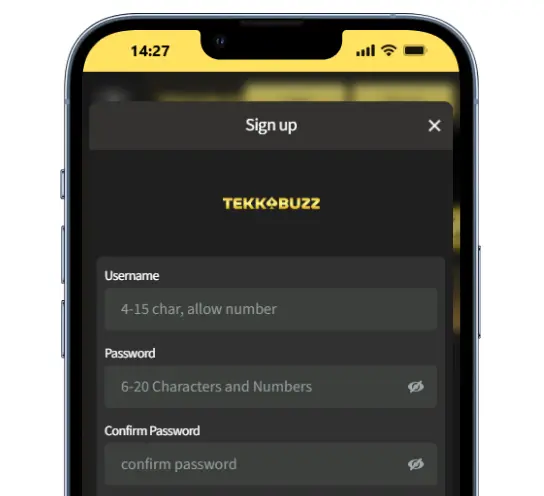
The mobile app allows new users to create an account and existing users to log in with their current details. The registration process follows the same structure used on the desktop website.
Once the account is created, the same login details can be used across desktop, mobile browser, and the mobile application.
Registration and login on the app gives you access to:
- Register a new Tekkabuzz account
- Login using an existing username and password
- Use the same wallet across desktop and mobile
- Confirm age eligibility before registration
How to Use the Tekkabuzz App for Sports Betting
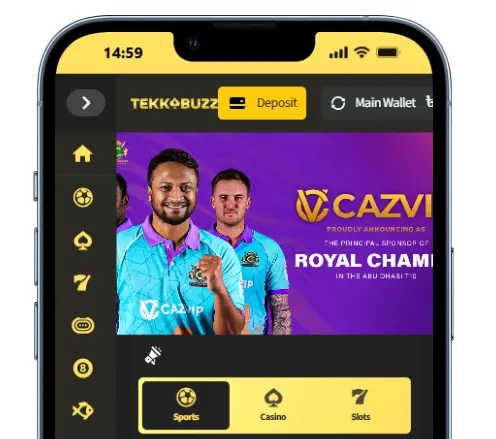
The sports betting section of the mobile app allows players to place bets before matches begin or during live events. Markets update continuously and can be accessed through the sports navigation menu.
Users can browse different sports competitions and select individual betting markets before placing a wager.
Sports betting features include:
- Pre match betting markets
- Live betting during matches
- Real time odds updates
- Bet history and settlement tracking
How to Use the Tekkabuzz App for Casino Games
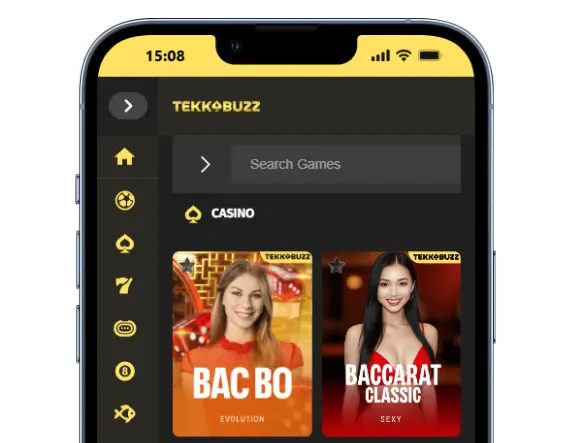
The casino section of the mobile app offers a wide selection of digital casino games that can be launched instantly from the game lobby. Players can browse game categories or search for specific titles using the navigation menu.
Games run directly inside the app without requiring additional downloads.
Casino gameplay on the app includes games such as:
- Slot games
- Live casino tables
- Table games such as blackjack and roulette
- Crash games and instant games
- Fishing style arcade games
How to Make Deposits and Withdrawals Using the App
The Tekkabuzz mobile app allows users to manage payments directly from the account dashboard. Deposits and withdrawals can be completed using the same payment methods supported on the desktop platform. The platform uses a single wallet system that connects casino games and sports betting to the same balance.
Payment features available inside the app include:
- Depositing funds using supported payment methods
- Requesting withdrawals from the account balance
- Viewing transaction history and account activity
- Managing the main wallet used for betting and gaming
App Security and Account Safety
The mobile application uses secure login sessions and account protection measures. Users are responsible for keeping their login details private and protecting their device. Account verification may be required before withdrawals or during security checks.
Security protections include:
- Secure login sessions
- Monitoring for unusual account activity
- Verification checks before certain withdrawals
- Protection against unauthorized access
Responsible Use of the Mobile App
Responsible gambling tools available on the desktop platform are also accessible through the mobile application. These features allow users to manage their betting behavior and control their account activity.
Responsible gaming options include:
- Account limits
- Temporary suspension
- Self exclusion requests
- Access to responsible gambling information
Tekkabuzz Mobile App FAQ
Is the Tekkabuzz mobile app free to download?
Yes. The Tekkabuzz mobile application can be downloaded and installed without any cost. Users only need to create an account if they want to place bets or play casino games with real money.
Can I use the same account on mobile and desktop?
Yes. The same Tekkabuzz account works across desktop, mobile browser, and the mobile app. All balances, bets, and account information are shared across devices.
Does the Tekkabuzz app support live betting?
Yes. The mobile application includes the full sportsbook, which allows users to place bets before matches start or during live sporting events.
Do I need to download games separately?
No. Casino games run directly inside the app. Players can launch games instantly from the casino lobby without installing additional files.